Saturday, January 31, 2026
  • Login
Euro Times
No Result
View All Result
  • Home
  • Finance
  • Business
  • World
  • Politics
  • Markets
  • Stock Market
  • Cryptocurrency
  • Investing
  • Health
  • Technology
  • Home
  • Finance
  • Business
  • World
  • Politics
  • Markets
  • Stock Market
  • Cryptocurrency
  • Investing
  • Health
  • Technology
Euro Times
No Result
View All Result

Download All Your Tweets and DMs In Case Twitter Shuts Down

by Nelson Aguilar
November 18, 2022
in Technology
Reading Time: 7 mins read
A A
0
Home Technology
Share on FacebookShare on Twitter


Elon Musk’s recent bizarre moves, like firing employees overseeing critical systems and then sending out an ultimatum email that reportedly caused hundreds of employees to quit, have put Twitter under strain and have many wondering if the popular social media service might go down.

If Twitter does shut down unexpectedly, all of your tweets, direct messages and other information could be gone forever — unless you download them now.

Fortunately, Twitter makes it easy to download a complete archive of your account that includes all of your past tweets and direct messages.

All you need to do is request the information from Twitter, and you’ll then be sent a file, which you can download to view all of your data from Twitter — for all time. Here’s everything you need to know about requesting and viewing your Twitter archive.


Now playing:
Watch this:

Twitter Blue: What is it?


3:37

How to request a copy of your Twitter data

The process of requesting your archive can only be done via the Twitter website, so I would suggest doing it on your desktop, but it can also easily be done on your phone or tablet. We’ll cover both options below.

If you’re on a mobile device, launch the Twitter app and tap your profile photo on the top-left to bring up the side menu. Next, scroll down and go to Settings and privacy > Your account > Download an archive of your data. This will launch an in-app browser, redirecting you to the Twitter website. Log in to the Twitter account you want your data from and tap Request archive.

On desktop, the process is pretty similar. Go to Twitter, tap on More and then go to Settings and privacy > Your account > Download an archive of your data. Enter your password as needed and click Request archive.
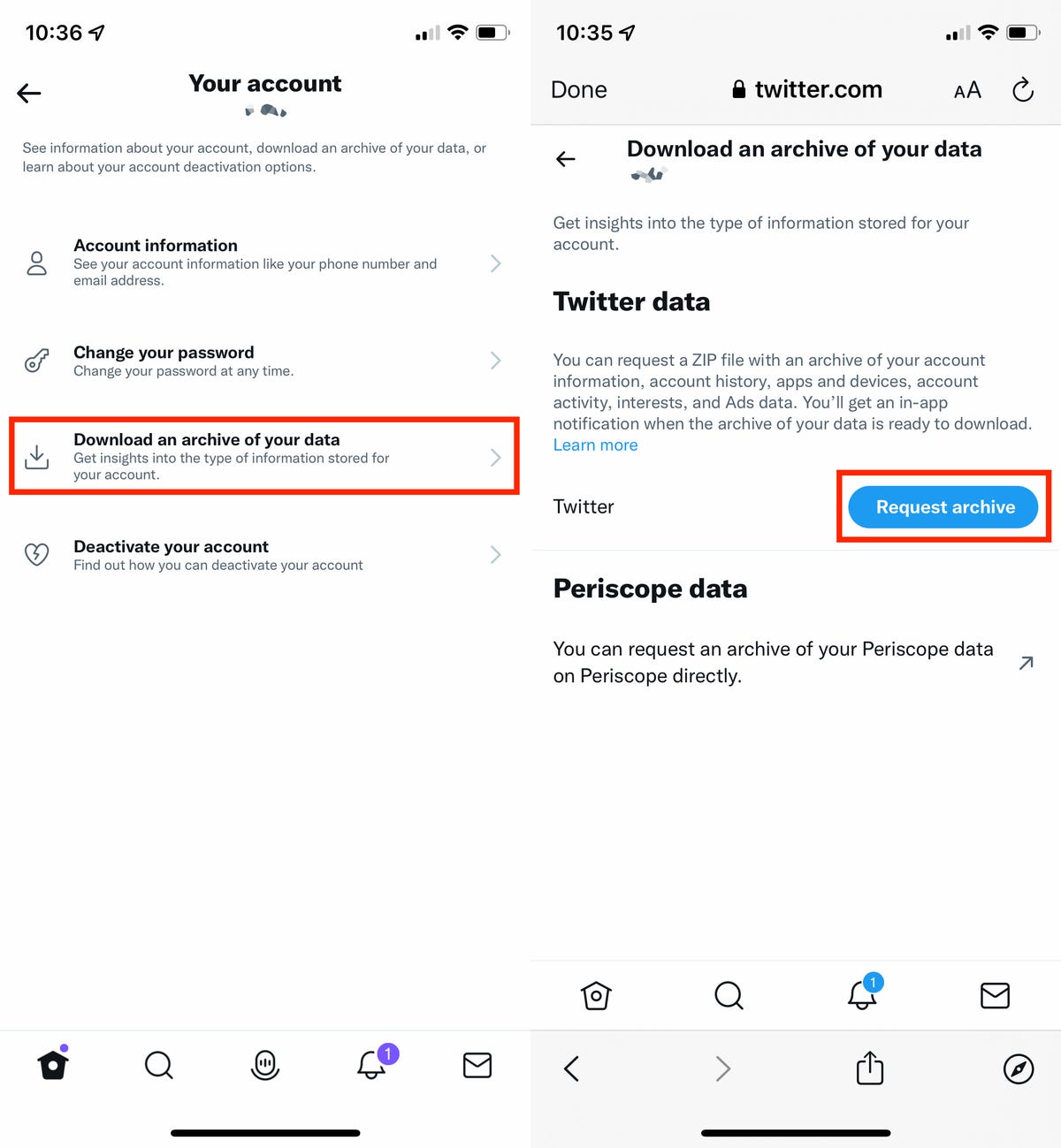
Settings to download Twitter data

Go to Settings and privacy > Your account > Download an archive of your data.


Nelson Aguilar/CNET

After you verify your account, the request will be processed and you’ll see a message stating it can take up to 24 hours for Twitter to process it. However, some users on Twitter are claiming that they’ve requested their archive, but have not received a download even after 24 hours.

What to do once your Twitter Archive is ready

Twitter will send you a push alert via the Twitter app as well as an email letting you know when your data is ready to download. Follow the link in the email or alert, which will direct you back to the Settings page on Twitter’s website. Download your archive and unzip the compressed file.

Inside the folder you’ll find a file titled Your Archive. It’s an HTML file, so it should open a new tab in your default browser. It’s not actually loading a website. Instead, it’s giving you a streamlined way to view your Twitter account. Everything on the page should be interactive. 

For example, if you click on Tweets, you’ll be taken to a Twitter-like view of your posts. There’s a search tool on the side of the page that will make it easier to find a specific post. 

Alternatively, you can open the Data folder where you’ll find media folders that contain photos, videos and GIFs you’ve sent or received on Twitter, Moments, direct messages or Fleets. 
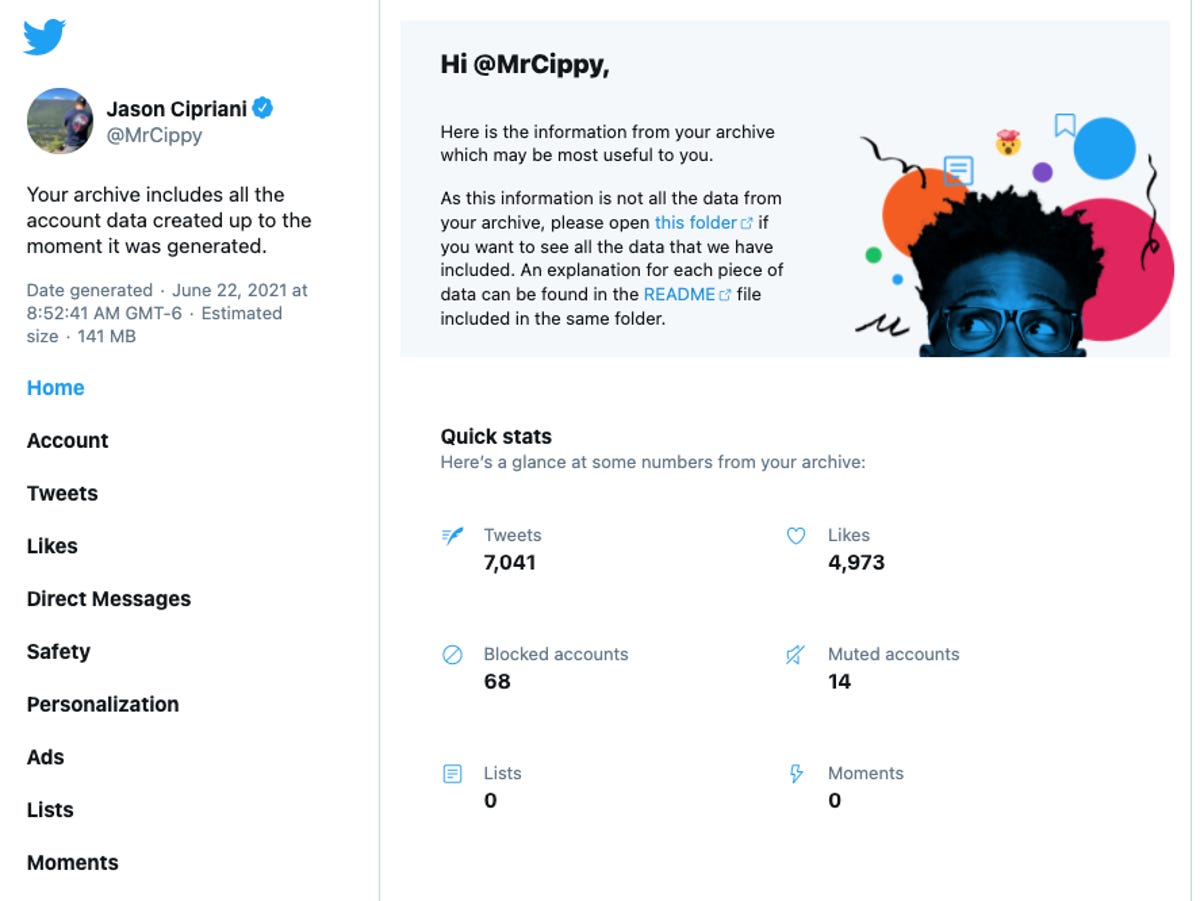
A Twitter archive

Your Twitter archive is organized in a way that resembles the Twitter website. 


Screenshot by Jason Cipriani/CNET

A friendly warning: You’ll find yourself taking a trip down memory lane after getting a copy of your archive. Writing this story took me twice as long as it should have because I kept going back and looking at old DMs and posts. 

Now that you’ve spent far too long looking through old messages, be sure to check out our helpful guides that walk you through downloading your data from Google and Facebook. Looking for ways to boost your Twitter account’s privacy? We have your back.



Source link

Tags: CaseDMsdownloadShutsTweetsTwitter
Previous Post

How A Data Processing Error Changed Our Deluxe Forecast

Next Post

rbi: Banks prefer to give loans now than buy bonds

Related Posts

Today’s NYT Wordle Hints, Answer and Help for Jan. 31 #1687

Today’s NYT Wordle Hints, Answer and Help for Jan. 31 #1687

by Gael Cooper
January 31, 2026
0

Searching for the most up-to-date Wordle reply? Click on right here for at present's Wordle hints, in addition to our every...

Gaming industry has embraced AI, but most game developers still think it’s bad

Gaming industry has embraced AI, but most game developers still think it’s bad

by Manisha Priyadarshini
January 31, 2026
0

The gaming {industry} is experimenting with AI sooner than ever, however it's doing so beneath a cloud of hysteria. A...

The Android Auto music UI is rolling back, and users can guess why

The Android Auto music UI is rolling back, and users can guess why

by Matt Horne
January 30, 2026
0

TL;DR The brand new Android Auto music participant UI seems to have been rolled again for some beta customers. Customers...

Hlynur Pálmason: The Love That Remains interview

Hlynur Pálmason: The Love That Remains interview

by Robyn Kanner
January 30, 2026
0

Anna and Magnus constructed a life collectively. That they had a house with three youngsters and a canine. Then they...

The iPhone just had its best quarter ever

The iPhone just had its best quarter ever

by Lucas Ropek
January 30, 2026
0

Apple had an important Q1, although iPhone gross sales had been the true standout. The corporate studies that its signature...

Apple just reported its best-ever quarter for iPhone sales

Apple just reported its best-ever quarter for iPhone sales

by Anna Washenko
January 30, 2026
0

Apple shared its newest quarterly monetary outcomes in the present day and the information is as soon as once more...

Next Post
rbi: Banks prefer to give loans now than buy bonds

rbi: Banks prefer to give loans now than buy bonds

Swifties Start Wave of Ticketmaster Monopoly Scrutiny By Bloomberg

Swifties Start Wave of Ticketmaster Monopoly Scrutiny By Bloomberg

Wheat Falling at Midday | Nasdaq

Wheat Falling at Midday | Nasdaq

January 31, 2026
Russia’s Security Best Guarantee of Ukraine’s Security

Russia’s Security Best Guarantee of Ukraine’s Security

January 31, 2026
Cavco Industries, Inc. (CVCO) Q3 2026 Earnings Call Transcript

Cavco Industries, Inc. (CVCO) Q3 2026 Earnings Call Transcript

January 31, 2026
Epstein files: US commerce secretary Howard Lutnick planned visit to Jeffrey’s private island

Epstein files: US commerce secretary Howard Lutnick planned visit to Jeffrey’s private island

January 31, 2026
Today’s NYT Wordle Hints, Answer and Help for Jan. 31 #1687

Today’s NYT Wordle Hints, Answer and Help for Jan. 31 #1687

January 31, 2026
Trump’s ‘armada’ issues warning to Tehran — RT World News

Trump’s ‘armada’ issues warning to Tehran — RT World News

January 31, 2026
Euro Times

Get the latest news and follow the coverage of Business & Financial News, Stock Market Updates, Analysis, and more from the trusted sources.

CATEGORIES

  • Business
  • Cryptocurrency
  • Finance
  • Health
  • Investing
  • Markets
  • Politics
  • Stock Market
  • Technology
  • Uncategorized
  • World

LATEST UPDATES

Wheat Falling at Midday | Nasdaq

Russia’s Security Best Guarantee of Ukraine’s Security

  • Disclaimer
  • Privacy Policy
  • DMCA
  • Cookie Privacy Policy
  • Terms and Conditions
  • Contact us

Copyright © 2022 - Euro Times.
Euro Times is not responsible for the content of external sites.

No Result
View All Result
  • Home
  • Finance
  • Business
  • World
  • Politics
  • Markets
  • Stock Market
  • Cryptocurrency
  • Investing
  • Health
  • Technology

Copyright © 2022 - Euro Times.
Euro Times is not responsible for the content of external sites.

Welcome Back!

Login to your account below

Forgotten Password?

Retrieve your password

Please enter your username or email address to reset your password.

Log In